Why Pricing Is the Biggest Trap in AI Video Tools (2026 Reality Check)
The “cheapest” tool often becomes the most expensive once you generate frequently, especially when every revision costs credits.


When you first land on an AI video tool’s pricing page, almost all of them look reasonable. Some start as low as $9 per month, and make you feel unlimited video generation is possible.
But after testing over 20 AI video generators, I learned something uncomfortable:
Most people don’t leave these tools because the quality is bad.
They leave because the pricing model punishes real usage.
By the time you hit:
- credit exhaustion
- export locks
- resolution limits
- “this feature requires Pro” pop-ups
you’ve already built part of your workflow around the tool.
In 2026, pricing transparency of AI tools matters more than feature lists because almost every tool can “generate a video.” What differs is how painful it becomes once you try to do it consistently.
The 3 Pricing Models You’ll Actually Run Into
Based on my testing, AI video generators have three major models of pricing plans. Let's explore them one by one.
1. Credit-Based Pricing (the invisible meter running in the background)
This is the most common, and the most deceptive.
You’re charged per:
- video generation
- seconds of output
- model used
- resolution chosen
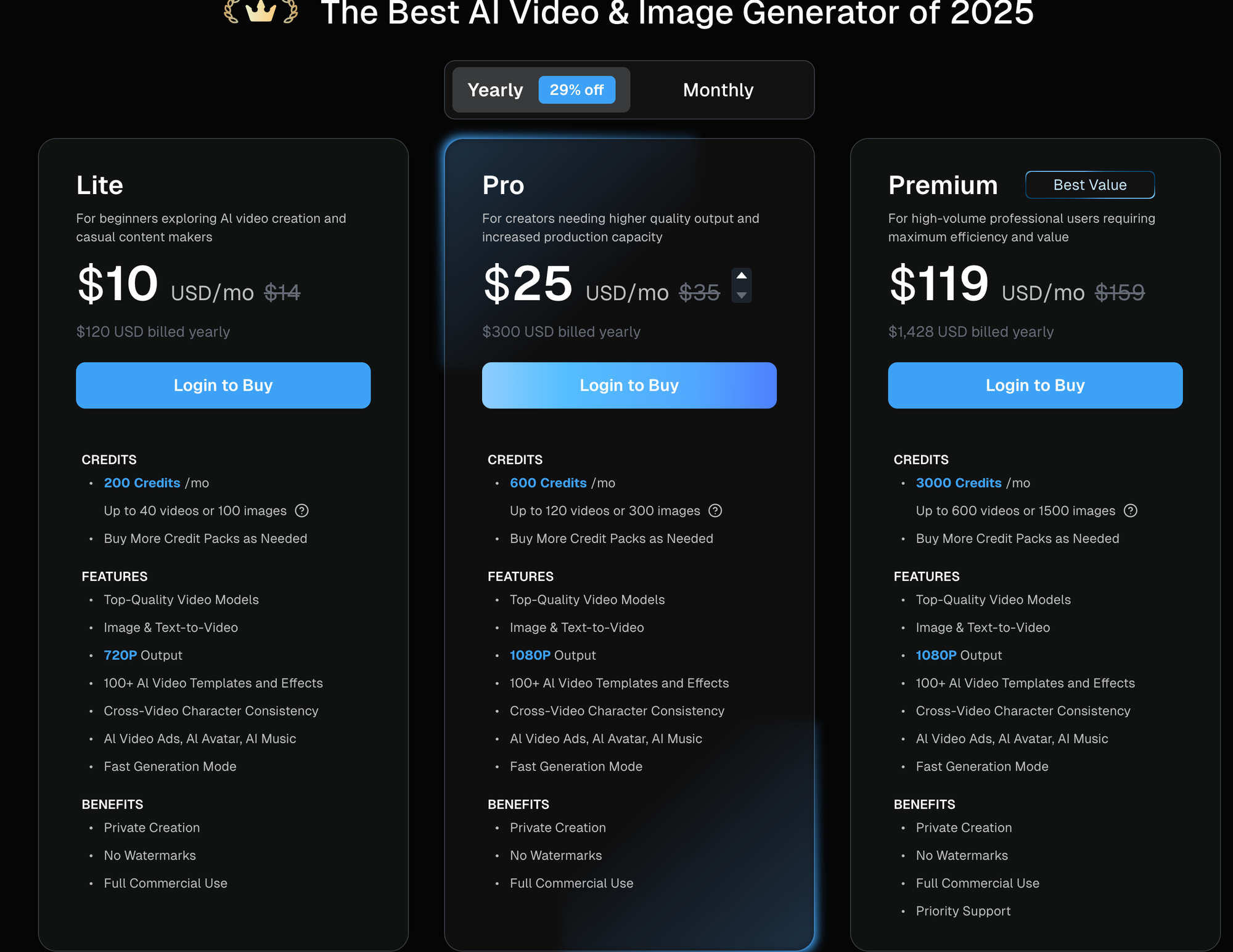
Tools like DeeVid AI are a good example of this model done fairly. You know upfront:
- Start Image mode costs fewer credits
- Between Images costs more
- Videos cap at 5–8 seconds
It’s predictable but still not cheap at scale.
Other platforms (especially avatar-heavy ones) burn credits faster when you:
- increase duration
- switch to premium models
- enable lip-sync
Who this works for
- Testing ideas
- Occasional social videos
- Short-form experiments
Where it breaks
- Daily content creation
- Long-form videos
- Agencies producing volume
This is how a “$10/month tool” can turn into a $60/week habit.
2. Subscription-Based Pricing (boring, but sanity-saving)
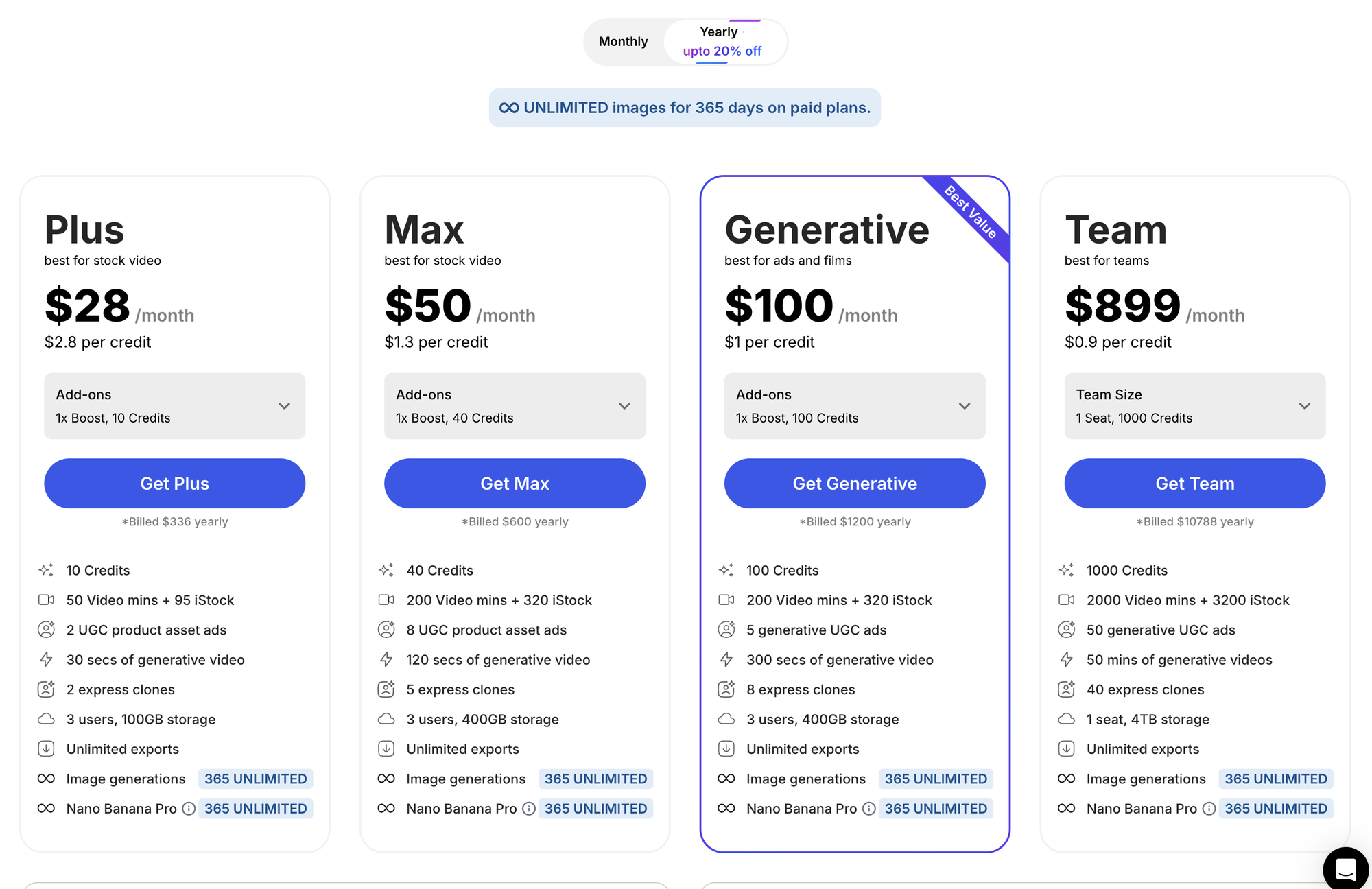
This is where tools like InVideo shine.
You pay a flat monthly fee, and in return you get:
- predictable exports
- consistent access
- no mental math per video
If you’re creating weekly or daily, this model feels relieving after credit-based tools.
You stop asking: “Can I afford one more generation?” Instead, you ask: “How do I make this better?”
Who this works for
- YouTubers
- Marketers
- Anyone repurposing content regularly
Where it falls short
- AI-heavy features may still be capped
- Voice or avatar usage can be limited
- Higher tiers are often required for serious output
Still, psychologically, this model is the least stressful.
3. Hybrid Pricing (free tier + credits + subscriptions)
This is the most common model in 2026, and the most confusing.
Tools like Higgsfield and Jogg AI sit here.
They often offer:
- daily free credits (great for experimentation)
- subscriptions to unlock models
- credits layered on top for heavy features
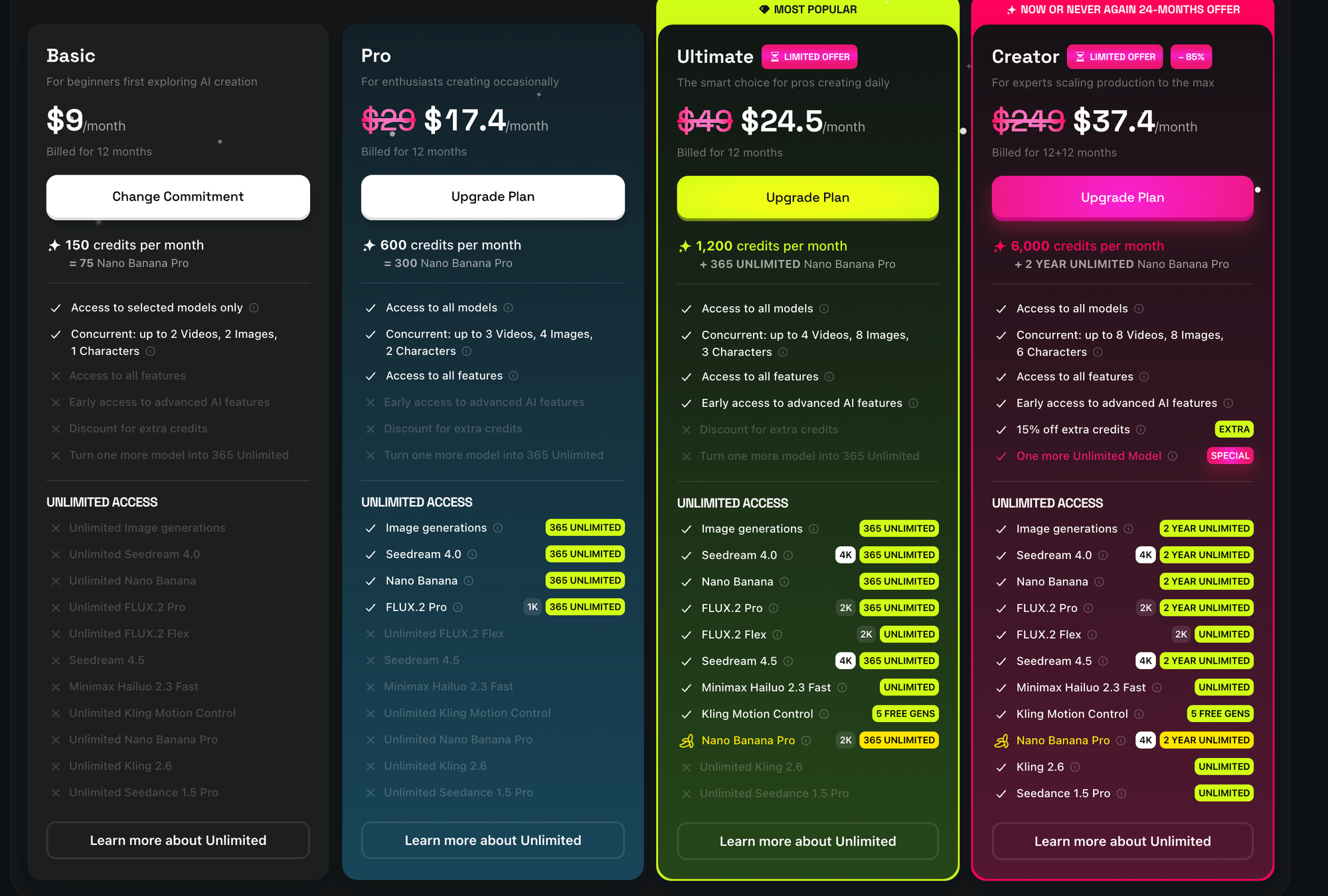
Higgsfield, for example, gives you daily free credits, which feels generous, until you realize:
- Image-to-video costs ~6 credits
- Lip-sync costs more
- Longer videos eat up credits faster
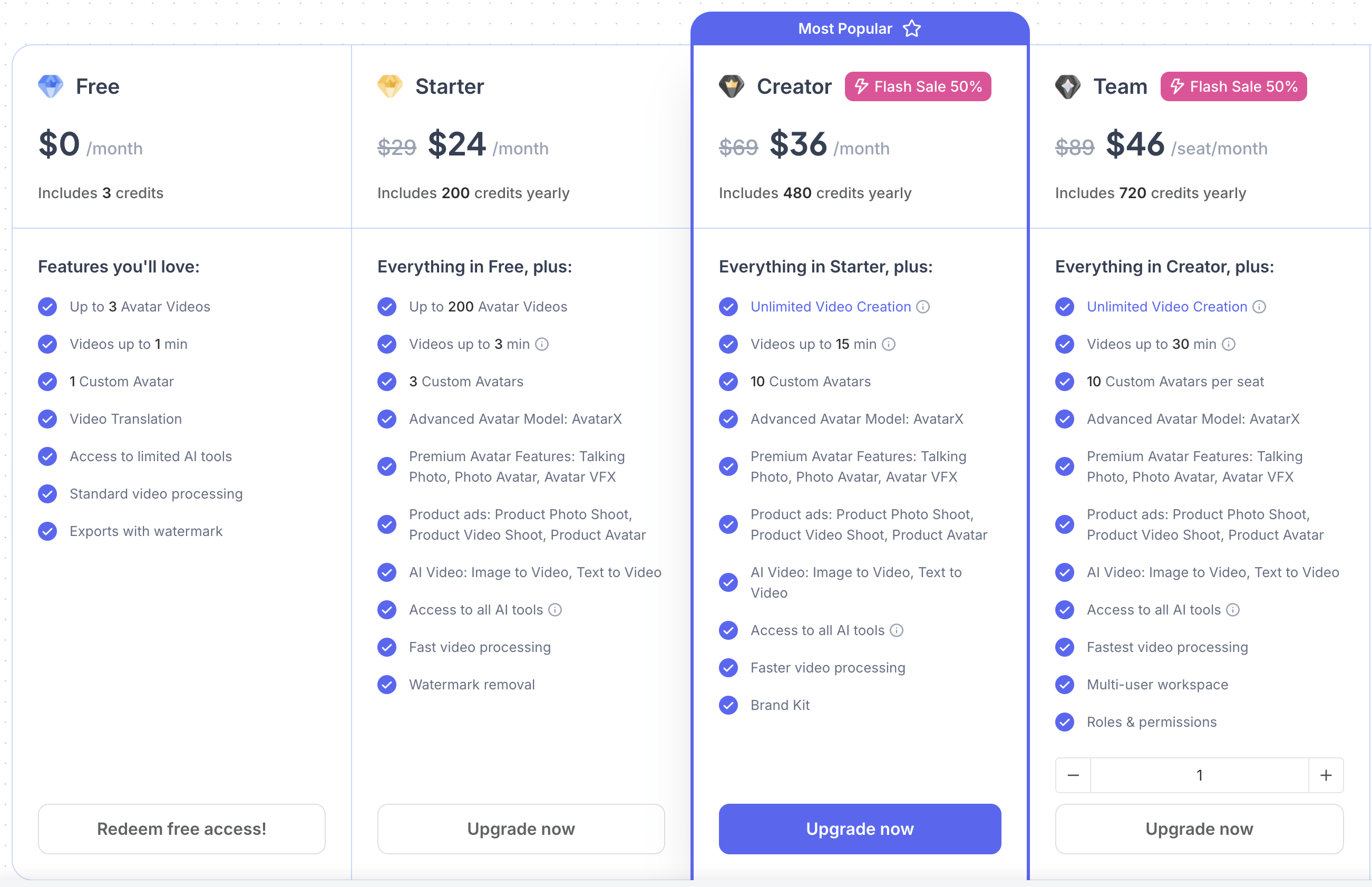
Jogg AI bundles everything: avatars, talking photos, product videos, but each feature draws from the same credit pool.
It’s powerful, but you need to understand your usage pattern, or you’ll constantly hit invisible walls.
Who this works for
- Creators testing many styles
- Social-first content
- People okay with learning a system
Where it fails
- Teams
- Predictable monthly output
- Budget-conscious creators
Hybrid pricing isn’t bad; it just demands attention.
What Pricing Actually Looks Like in 2026
After testing real tools with real output:
- Budget tools: ~$10–$20/month→ fine for testing, fragile for scaling
- Creator tools: ~$20–$40/month → best balance of flexibility and sanity
- Agency / enterprise tools: $50+/month → only worth it if volume justifies it
The irony?
The “cheapest” tool often becomes the most expensive once you generate frequently — especially when every revision costs credits.
Here's a detailed pricing comparison table featuring the 10 AI video generators I tested -
AI Video Generator Pricing Comparison (2026)
| Tool | Pricing Model | Free Plan | Paid Plans (Starting) | What You Actually Pay For | Best For |
|---|---|---|---|---|---|
| DomoAI | Credit + Subscription (Hybrid) | ✅ Free credits | Paid plans scale (Standard / Pro) | Credits per generation, style complexity, resolution (up to 4K) | Creators who want high-quality animation with flexible styles |
| RecCloud | Subscription + Credits | ✅ Usable free plan | ~$1–$9/week or ~$20/month | Minutes of processing across transcription, video, TTS, translation | Educators, podcasters, creators repurposing content |
| DeeVid AI | Credit-based | ✅ 16 free credits | $10/month (Lite), $25/month (Pro) | Credits per video (Start / Between / Reference modes) | Short-form image-to-video for social and ads |
| Higgsfield | Hybrid (Daily free credits + Subscription) | ✅ 10 credits/day | $9/month (Basic), $17.4/month (Pro) | Credits per feature (image-to-video, lipsync, ads), model access | Social content, UGC ads, multi-model experimentation |
| Jogg AI | Credit-based Subscription | ✅ Limited free plan | $24/month (Starter), $36/month (Creator) | Credits across avatars, talking photos, ads, topic-to-video | Avatar-heavy content, educators, marketers |
| InVideo | Flat Subscription | ✅ Free (watermarked) | $28/month (Business) | Unlimited exports, stock media, templates | YouTubers, marketers, consistent video output |
How to Choose the Right Pricing Model (Before You Commit)
Before you look at features, ask yourself:
- How many videos do I create per week?
- Are they 5–10 seconds or 2–3 minutes?
- Do I need avatars, voice, or just visuals?
- Am I experimenting or publishing?
If you’re experimenting → credits are fine.
If you’re publishing → subscriptions win.
If you’re scaling → clarity beats flexibility.
👉 I broke down pricing, credit burn, and real value across 20+ AI video tools, based on hands-on testing, not pricing pages.
See the full comparison here → Best AI video generators 2026
🙌 Affiliate Disclosure
This post contains affiliate links. If you purchase through them, I may earn a small commission at no extra cost to you. I only recommend products I trust or use myself. Your support keeps my content journey going — thank you!